

How to Manually Install Gym Bag Digital on Android (Sideloading)
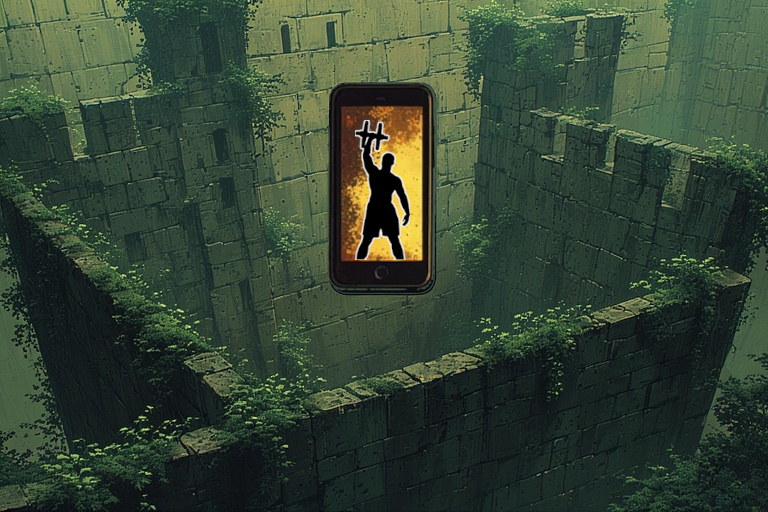
As of now, you can only install Gym Bag Digital on Android via side-loading. That basically means bypassing Google's Play Store to manually install an application. Below I'll explain why this is the only way to use the app and how to sideload Gym Bag Digital on Android.
- Why Can't I Install Gym Bag Digital from the Google Play Store?
- What is Sideloading??
- Why Sideload Apps on Android?
- Is Sideloading Apps on Android Safe??
- How to Sideload Apps without Enabling Unknown Sources?
- What About iPhones and Apple App Store?
- How to Manually Install Gym Bag Digital on Android Phones?
Why Can't I Install Gym Bag Digital from the Google Play Store?
I haven't completed the process to upload apps to the Google Play Store. it's not free and I'm not yet willing to pay for the exposure yet. That leaves one other option: sideloading.
What is Sideloading?
Android sideloading is the process of installing applications from any source other than the Google Play Store. Like computers, you can install Android applications (.APK file extension) from:
- Websites
- Computer USB-connected file transfers
- Third party app stores (e.g., APKMirror)
All app download sources other than the official Google Play Store are known as "unknown sources."
Why Sideload Apps on Android?
Most people sideload apps because they're not available from Google Play. This includes apps which:
- Download other apps (e.g., APKMirror and the discontinued Amazon Appstore)
- Are only available in certain countries (e.g., TikTok)
- Add stronger privacy features
- Remove bloatware from the Android device
- Collect user data without proper consent or handling (spyware)
- Provide unauthorized access to the device (malware)
- Have hidden fees or other deceptive pricing practices
Is Sideloading Apps on Android Safe?
That depends on your due diligence and self-trust with techy things. Android disables sideloading by default for security reasons. Apps in the Google Play Store have undergone security auditing by Google Play Protect to ensure safety. When you sideload an app from an external source, you bypass some of these security procedures. You can manually submit an app to Google Play Protect, but that's only after you've enabled sideloading and downloaded the app to your device. Other reasons sideloading Android applications is considered risky mostly relate to user error. It's possible to download a file from a malicious website that looks just like the real one (phishing site or spoofed site). One could misconfigure the phone while trying to enable sideloading.
For many people, the sideloading process is too frustrating and not worth the effort. You must research and determine whether you trust:
- The app itself
- The app developer (me in this case)
- Your decision based on instinct and your research on the above
It's easy to submit a file for a free online virus scan without putting your digital device at risk. I've submitted Gym Bag Digital version 1.0.1 to the most popular malware scanners I know:
- VirusTotal.com
- Kaspersky.com
- virusscan.jotti.org uses over a dozen popular virus scanners at once including Avast, Bitdefender, and more
- Internxt.com
MetaDefender reports a false positive, marking the in-app contact forms by Web3Forms as "malicious." I'm guessing it's because the term "web3" is oftentimes affiliated with scams. Web3forms is just an easy-to-use contact form. I'm working on this now.
As a cybersecurity enthusiast, I must warn you that malware scanners aren't 100% effective. But the results should help you make a more informed decision.
I know, reading privacy policies and terms of service is a pain in the butt. Lots of words and "legalese" (writing for legal discourse). But both can show how much the provider respects user privacy. The two biggest things to look for: GDPR data requests and whether they sell your info. If you'd rather not read the Gym Bag Digital privacy policy, hopefully it'll soon be accepted to Terms of Service; Didn't Read (ToS;DR).
Lastly, ensure it's up-to-date. My app checks for updates daily.
Another thing to check when deciding to sideload an app is it's reviews. I have none, which is why I'm not asking you to trust me. I'm simply arming you with the necessary information to decide what's best for you.
How to Sideload Apps without Enabling Unknown Sources?
If you don't want to fiddle with phone settings to install an app, third party app stores are a hybrid solution. In summary, you download an app store from Google Play Store which has it's own app repository and screening procedures. Per user reviews, F-Droid, APKMirror, and Aptoide are the best apps for sideloading Android APKs. All three have well-trusted app vetting processes. APKPure is another option but has a negative reputation for not vetting APK files for malware, and lack of transparency in ownership. Despite this, you may find more content comparing APKMirror vs APKPure for sideloading because of marketing efforts.
The greatest benefit to using third party app stores vs sideloading is that you can (not saying you should) delegate the screening process to the app, just as you might with Google Play Store (again, not saying you should). This is the easiest option for those curious about how to sideload apps safely on Android without changing phone settings.
I've submitted the app to APKMirror (official sideloader app) but they never responded or uploaded it. Judging by their FAQs, I'm guessing it's because the app is from an unknown software developer - this is my first software release - and isn't unique.
That's everything you need to know about the sideload vs google play store install comparison.
What About iPhones and Apple App Store?
From what I've read, releasing an app for Apple requires having an Apple computer. I don't have a MacBook. When I researched how to sideload apps on iOS, every solution was far too cumbersome for most people. At this time, I have no plans to release this app for the Apple walled garden. I don't think most Apple users will care with the advancements to Apple Fitness Plus.
I recommend Apple users check back periodically for updates on the web application version coming soon. The cloud-based version will be available on all devices.
How to Manually Install Gym Bag Digital on Android Phones?
The steps below will explain how to sideload apps on Android without a PC.
- Update your phone for peace of mind and the unlikely chance that the app is incompatible with something outdated on your phone.
- On the phone, go to your Settings menu.
- Select "Security and privacy."
- Select "Install Unknown apps."
- Enable for "My Files."
- Open your smartphone browser and download Gym Bag Digital.
- Navigate to your files folder and select the APK file.
- A warning will appear.
This type of file may harm your phone.
Only download this file if you trust it's source.
gym-bag-digital-[version].apk.bin
Source : gymbagdigital.jtspratley.com
Select "Download." - Depending on your browser security settings, you may see another warning.
This file will be downloaded and shown outside of Secret Mode.
Source: gymbagdigital.jtspratley.com
Select "Download."
The download should take approximately one minute. - Once the download is complete, select the APK file from your notification or files directory.
- Select "Install."
- You may see a Google Play Protect notification asking to scan it. If so, scan it for reassurance.
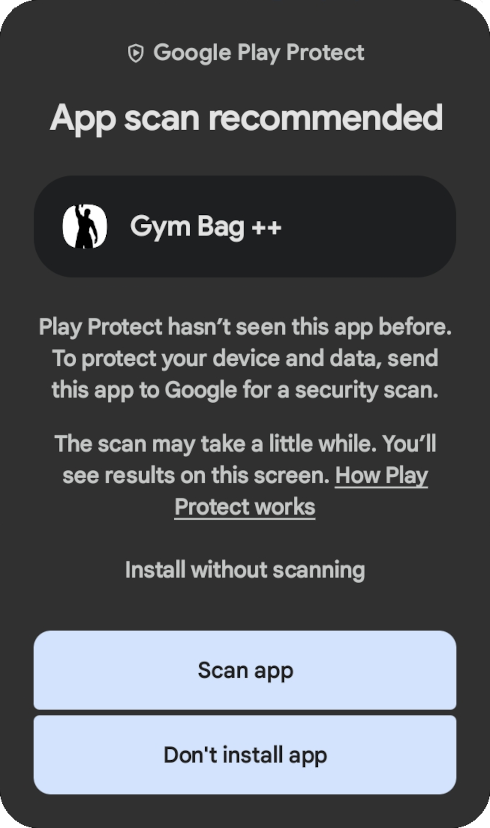
App scan recommended Play Protect hasn't seen this app before. To protect your device and data, send this app to Google for a security scan. The scan may take a little while. You'll see results on this screen. How Play Protect Works
Select "Scan app." - Open the app and enjoy.
Please provide feedback if you have any questions, comments, or concerns.
Tags: health, IT, fitness, software-development